


HD Video Player & Downloader
3.524.00 Reviews
App Specs
- Version
- 9.0.0
- Updated On
- License
- Free
- Downloads
- 1,000,000+
- Developer
- Breed Vision
- Categories
- Video Players & Editors
- Platform
- Android
Screenshots
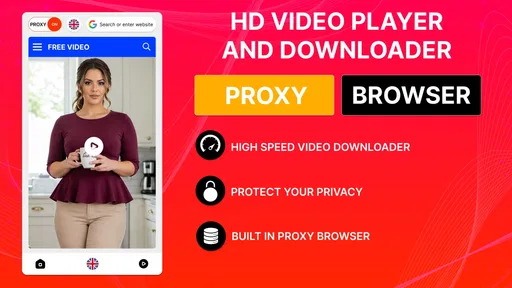
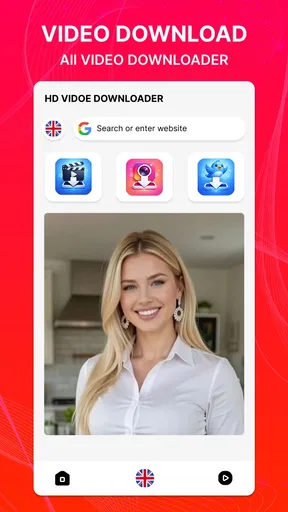
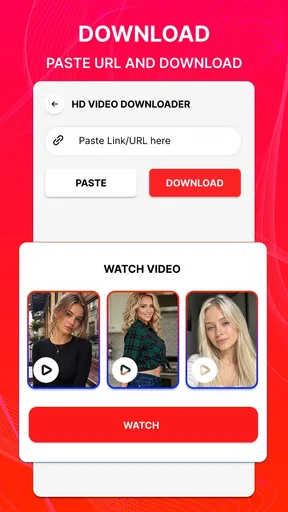
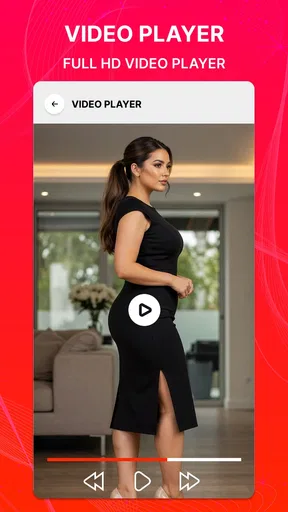
 Analysis by AppCompare
When I’m choosing a video app, I want two things to work together: a player that makes files on my phone easy to watch, and a practical way to save videos for later. HD Video Player & Downloader brings those jobs under one roof. It is a free video app from Breed Vision, and its focus is straightforward: playback alongside downloading, rather than a broad set of editing tools. I’d consider it most useful for people who regularly watch saved clips and want a dedicated place to handle them.
How it fits into everyday video watching
We’ve all been there, trying to watch a video on our phones, only to be frustrated by buffering or poor quality. With the HD Video Player & Downloader, you can wave goodbye to those days. This app offers a seamless experience, ensuring that your videos play in high definition without a hitch. But, that’s just the tip of the iceberg.
The practical distinction is that downloading and watching are presented as connected tasks. For a commute, a trip, or a place where mobile reception is unreliable, saving a video before leaving can be more useful than relying on a stream to keep playing. I’d treat the app as a convenient option for personal video viewing, not as a replacement for every streaming service or a general-purpose media library.
Features That Make It Stand Out
One of the first things you’ll notice about this app is its clean and intuitive interface. You don’t need a degree in tech to navigate it. Everything is laid out clearly, making it easy for anyone to use. Let’s dive into some of its standout features:
- Smooth Playback: Whether it’s a 720p, 1080p, or even higher, this app handles it like a champ. No more stuttering or buffering.
- Download with Ease: Found a video you like? Download it with just a tap. It’s that simple. You can even choose the quality you want to save it in, which is a nifty feature.
- Support for Various Formats: From MP4 to AVI, this app supports a wide range of video formats. So, whatever you throw at it, it’ll play.
- Customizable Settings: Want to tweak the brightness or volume with a swipe? You got it. The app allows you to customize your viewing experience to suit your preferences.
A useful way to approach the download option is to decide how you’ll watch before saving a file. If it is for a small phone screen and a short journey, a lower-quality copy may be a sensible choice; if you plan to view it on a larger display, preserving more detail may matter more. That trade-off between storage space and image clarity is worth considering instead of automatically choosing the largest file.
How It Enhances Your Viewing Experience
Imagine sitting on a train or chilling at a café. You whip out your phone, and bam – you’re watching your favorite video in glorious HD. The HD Video Player & Downloader doesn’t just play videos; it enhances them. The app automatically optimizes video playback based on your device’s capabilities, ensuring you get the best experience possible.
And let’s talk about the download feature for a second. Ever tried downloading a video, only for it to take forever or, worse, fail entirely? This app’s download manager is fast and reliable, making it easy to save videos for offline viewing without the usual headaches.
Worth Reading Before You Choose

EA SPORTS FC Mobile 26 Is a Bigger Football Game, but It Takes Time

Flipboard Shows What News Apps Must Do Beyond the Feed

Switching to Android Auto Means Rethinking Your Driving Routine

Google Calendar Makes a Crowded Week Easier to Manage

Ludo King Makes the Most of the Minutes Between Plans

Baby Panda World Brings Quick Play to Modern Phones, but Its Game Library Feels Busy
One workflow I’d use is to save a few videos while connected to a dependable network, then check that the files are available before heading out. That small check is especially helpful if the videos are meant for a long ride or a waiting room: a completed download is more useful than a queue you assumed had finished. I’d also keep an eye on available phone storage, since offline viewing trades network dependence for space on the device.
For downloaded clips, a little organization can make the player more useful over time. I’d remove files once I no longer need them and avoid saving multiple versions of the same video unless image quality is genuinely important. This is a simple habit, but it reduces clutter and makes a short list of travel or reference videos easier to find when I’m in a hurry.
Where it sits beside other video options
Compared with using a phone’s built-in player, a dedicated app that also handles downloads can be appealing when you want playback and offline viewing in one place. The built-in option may still be enough if you only open occasional local clips and do not need a separate downloading workflow. On the other hand, a streaming service is usually the more natural choice for licensed catalogs, recommendations, and watching content directly online; this app makes more sense when you already have videos you are entitled to save and play.
It is also not the same kind of tool as a video editor. If your goal is to trim footage, add titles, assemble clips, or prepare a polished social post, an editor is the better fit. Here, the value is in watching and saving, not creating. That narrower purpose is a strength for someone who wants a simple video utility, but it means the app should not be judged as an all-in-one media studio.
Who is likely to get the most from it?
I can see this being useful for someone who keeps personal videos on a phone, saves permitted clips for offline viewing, or wants a player with playback controls that can be adjusted while watching. A realistic example is preparing for a train commute: before leaving home, I would save a couple of videos I have permission to download, choose a file quality that suits the screen and storage I have, and then play them without depending on a steady connection on the way.
It may be less suitable if you mainly watch subscription content inside its official app, need a large-screen home theater setup, or want advanced editing and library management. In those cases, the dedicated streaming service, a desktop media organizer, or an editor may better match the task. I would also think twice if I rarely watch downloaded videos; a separate utility is less valuable when the phone’s existing player already handles my small collection comfortably.
The app is rated for Everyone, and its current version is 9.0.0. That gives prospective users a useful sense of its current release, but a version number alone does not tell me how much the interface or feature set has changed over time. If you already use it, the practical question is whether the current build continues to fit your routine: does it open your usual files, make saving straightforward, and keep playback controls comfortable on your device?
What to keep in mind before relying on downloads
Downloading is not automatically appropriate for every video. I’d save only content that I own or have permission to download, and I would follow the rules of the site or service where it comes from. This matters because a downloader’s convenience does not change the rights attached to a video. For anything tied to an account, a paid service, or a creator’s terms, I’d use the official offline option when that is the permitted route.
There are also ordinary practical limits to offline viewing. A saved file uses storage, and choosing higher quality can make that trade-off more noticeable. If a download seems unnecessary for a clip I can easily stream later, I would leave it online rather than fill my phone with files I am unlikely to reopen. For a video I know I’ll need without a connection, saving it in advance is the more useful choice.
Is It Worth the Download?
In a word: absolutely. If you’re someone who watches a lot of videos on your phone, this app is a game-changer. It’s not just about playing videos; it’s about how you experience them. With the HD Video Player & Downloader, you have a tool that not only plays your videos in the best quality but also allows you to customize and download them with ease.
Its scale is established, with over one million installs, while its average rating is 3.5 from around 1,700 ratings. I read that as a reason to approach it with sensible expectations rather than assume it will suit every device and workflow equally well. The app is free, so it is relatively easy to try if its combination of playback and downloads matches your needs, but I would judge it by how it handles the files and routines that matter to me.
Now, a word of advice: while the app is fantastic for downloading videos, always make sure you’re downloading content legally and ethically. Respect copyright laws and ensure you have the right to download the content you’re interested in.
All in all, if you’re tired of your current video player’s limitations, give this app a shot. It’s easy to use, packed with features, and designed to make your video-watching experience as smooth as possible. So, why not give it a whirl and see for yourself?
Download it now and take your video experience to the next level!
Pros
- Supports a wide range of video formats.
- User-friendly interface for easy navigation.
- Offline viewing with download feature.
- Adjustable playback speed and subtitles.
- High-definition video quality support.
Cons
- Contains intrusive ads during playback.
- Limited customization options for UI.
- Large app size may affect storage space.
- Some features require in-app purchases.
- Occasional buffering issues on slow connections.
FAQs for HD Video Player & Downloader
What video formats does the HD Video Player & Downloader support?
The HD Video Player & Downloader is designed to support a wide range of video formats including MP4, AVI, MKV, FLV, and MOV, among others. This versatility ensures that users can play almost any video file without needing to convert it, making it a convenient tool for diverse media collections.
Can I download videos from online platforms using this app?
Yes, the HD Video Player & Downloader allows users to download videos from various online platforms. However, it's important to note that downloading copyrighted content without permission may violate terms of service and legal restrictions. Always ensure you have the right to download content before proceeding.
Is the HD Video Player & Downloader free to use, and does it contain ads?
The app is available as a free download, but it may contain ads to support its development. Users can often find an option to remove ads through a one-time purchase or subscription within the app, providing an ad-free experience and supporting the developers.
Does the app offer any advanced playback features?
Yes, the HD Video Player & Downloader offers advanced playback features such as subtitle support, variable playback speeds, and an equalizer to enhance audio quality. These features are designed to provide a customizable viewing experience, catering to user preferences and enhancing overall media enjoyment.
Is the app safe to use, and how is user data handled?
The HD Video Player & Downloader prioritizes user safety by ensuring regular updates and security checks. It adheres to privacy guidelines, meaning user data is handled with care and not shared without consent. Always download the app from reputable sources to ensure authenticity and security.


